kuniga.me > NP-Incompleteness > Linux Memory Reclamation
Linux Memory Reclamation
11 Sep 2026

For most operating systems, when memory usage grows beyond what the hardware can support, the kernel starts swapping, i.e. moving data from memory to disk. In this post, we’ll study how the Linux kernel does this, as part of the more general memory reclamation process. We’ll also cover the memory allocation flow, because memory reclamation is just one part of it, one of the unhappy paths.
First, we’ll go over the different components involved, and then how they fit together in the memory allocation flow and then memory reclamation via swap and zswap.
Concepts
Pages
A page is a chunk of contiguous memory. We’ll assume an x86-64 Linux configuration and that a page is 4KB ($2^{12}$ bytes). A page can be virtual (a chunk of virtual memory) or physical (a chunk of physical memory). To avoid ambiguity, we’ll assume a page is virtual and denote a physical page as a page frame.
Pages are useful because that’s the minimum granularity the kernel supports in terms of allocation.
Virtual Memory
When a process is created, it gets its own virtual address space. In 64-bit systems it can theoretically represent $2^{64}$ bytes, but in practice the range is smaller due to how addresses are encoded.
We’ll talk about page tables later, but it suffices to know a virtual address is composed of 4-5 regions + offset. The regions identify the location of the page, and the offset is the distance from the start of that page. Each region supports 9 bits, and since a page has 4KB, we need 12 bits to address it, so a system with 5 regions can represent $5 \cdot 9 + 12 = 57$-bit virtual addresses.
When we use syscalls like mmap() or brk(), the kernel reserves a range of the virtual address space, called a Virtual Memory Area (VMA), and returns the start of that virtual address range. This address is not backed by physical memory.
The list of VMAs is kept in a data structure called Maple tree. We won’t go over details, but it can efficiently determine the VMA of a given virtual address. We’ll call this structure the VMA tree.
There’s a special section of a process’ virtual address space which is reserved for the kernel, usually high addresses. The reason for this is so that kernel objects don’t need a special address space. They can use the same space as the process being executed.
Physical Memory
The physical memory is the RAM that you can actually write to. As we said, virtual memory is not initially backed by physical memory. This only happens when we write to it, which triggers a page fault, which causes the kernel to finally try to back the page being written to by a page frame. We’ll cover this flow in more detail later. The important part to note is that mapping virtual pages to physical pages is lazy.
Another important fact is that the kernel overcommits (analogous to overbooking in airlines). When multiple callers call mmap(), it won’t fail the call if the amount of virtual memory used exceeds the host or cgroup memory. That’s because the kernel knows that most of the time not all the requested memory will be used (think of .reserve() vs .size() in std::vector).
Recall that two different virtual addresses can map to the same physical one. For example, when we fork() a process, the child process inherits the addresses from the parent, including the mapping to physical memory. However, this is COW (copy-on-write): the moment one attempts to write, the contents are copied to a new location.
As we mentioned, the physical page is also 4KB and aligned to 4KB, so we can drop the 12 least significant bits when representing it. This representation is called a page frame number or PFN. The kernel maintains a structure with metadata on a struct page (ignore the contents for now):
struct page {
    /* ... */
};
Conceptually, this struct lives in a giant array, vmemmap, and the PFN is an index in this array. So if we want to access the metadata for a given PFN, we do vmemmap + PFN.
Note that because this is a struct that lives in the kernel, it’s subject to the same memory layout: it’s divided into virtual pages that are mapped to physical pages, which have metadata in vmemmap. There’s some degree of circularity that can be mind-bending.
Page Table
The mapping from virtual to physical memory is kept in a structure called a page table. Conceptually, it’s a map from the 57-bit virtual address (see Virtual Memory) to a 64-bit number, encoding the physical address. Because we can drop 12 bits of the physical address (due to 4KB alignment), we can reuse them for metadata / flags.
The problem with storing all virtual page mappings in a single contiguous array is that this would have to be mapped to a similarly gigantic array in the physical memory. Instead, we use an n-ary tree where each node is a page. The “regions” we mentioned in Virtual Memory are each level of this tree, so for 5 regions the tree has depth 5.
Each internal node has 512 entries pointing to the 64-bit physical address of the children nodes. Each leaf node contains 512 entries of the 64-bit physical address, which are the mappings for the virtual addresses. But which virtual address? Recall that a virtual address has 5 parts that identify the virtual page + an offset. Each of these parts corresponds to the entry index in a given node.
For example, if we have the parts 41, 121, 5, 203, 57, this tells us: in the root, get the physical address at entry 41 and navigate to that child. Then do the same for entry 121 and so on. After following 203, we’ll arrive at the appropriate leaf. Now we look up the entry 57 and the corresponding physical address is the mapping for the virtual address 41, 121, 5, 203, 57! So 41, 121, 5, 203, 57 is really a path on this tree (think of JSON paths).
The regions or levels in this tree have weird acronyms: PGD (root, Page Global Directory), P4D (level 1, Page 4th-level Directory), PUD (Page Upper Directory), PMD (Page Middle Directory), PTE (leaf, Page Table Entry). There’s one such structure per virtual address space, so simplistically, one per process.
Note that this structure grows on demand. If there’s only one entry, we’d have one node per region. When the 512 entries on the first leaf fill up, we add a new leaf, etc.
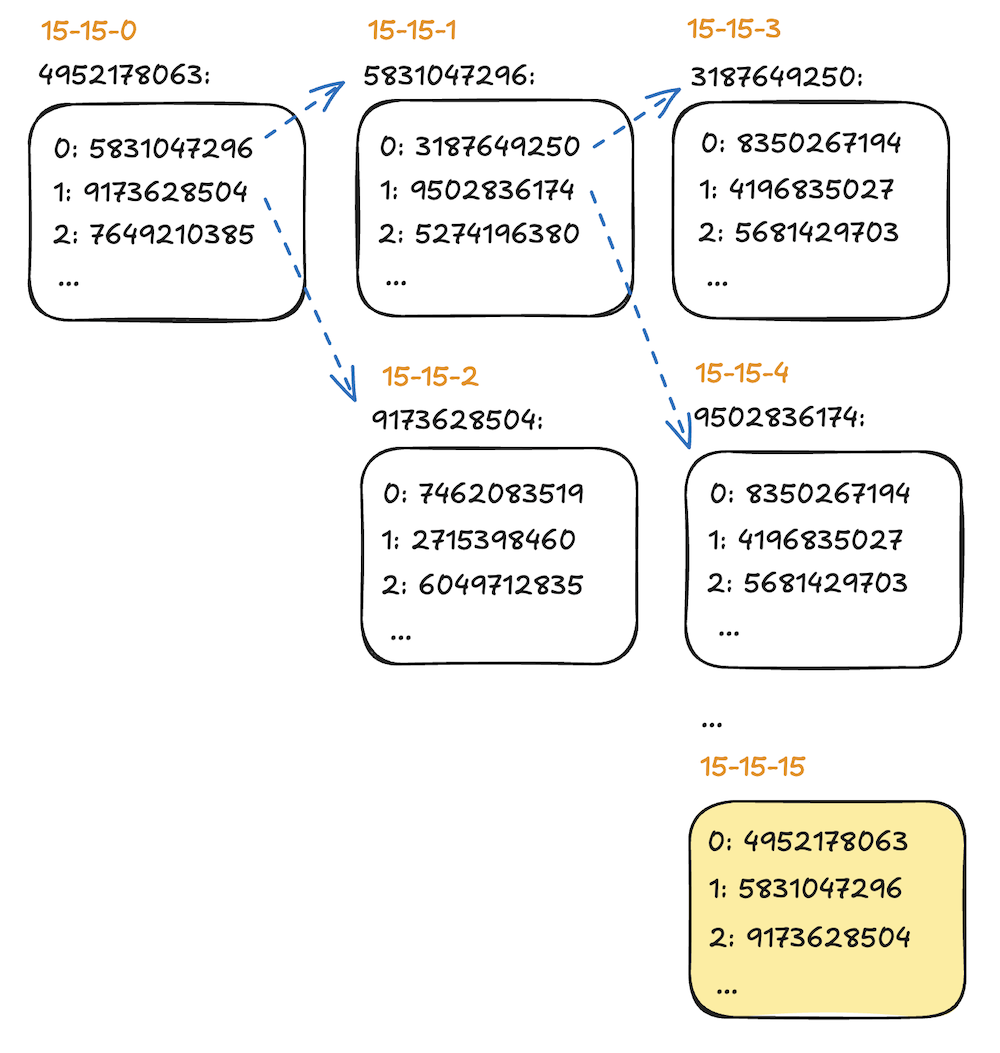
Note that the page table works directly with physical addresses, not virtual. This is very important because the CPU (see TLB) must be able to traverse this table and it has no knowledge of virtual addresses.
Kernel. As we mentioned in Virtual memory, a portion of the process’ virtual address space is reserved for the kernel. Since the mapping is consistent across processes, they can actually share the same “node” in the page table. In Figure 1, the yellow page contains addresses for the kernel virtual spaces. So different processes would have their own page table, but they would “point” to this same yellow node.
Bootstrapping. Note that the nodes themselves are pages, so their addresses must be in the page table! In Figure 1, the yellow node contains the mapping for the other nodes. For example, 15-15-1 maps to 5831047296.
This creates an interesting problem: how are the first nodes added to this tree? When the kernel is bootstrapped, it can initialize a minimal table with some pages pre-mapped.
Zones
Zones are partitions of the physical address space. Typically, there are 3 zones: ZONE_DMA for low addresses (less than 16MB), ZONE_DMA32 for the 32-bit address space (less than 4GB), and ZONE_NORMAL for the rest. These exist for legacy reasons; for example, ZONE_DMA32 is needed to support devices limited to 32-bit addresses. For hardware using NUMA, there’s at least one zone per NUMA node.
The partition of addresses to zones is fixed: we cannot transfer pages between them. It is possible to copy pages between zones and the kernel might do it outside of the memory reclamation process.
Buddy Allocation
The Page Table stores the mapping from virtual to physical, but how does it decide which physical page to map to? The kernel uses an implementation of the Buddy Memory Allocation, which is also used by the Jemalloc Memory Allocator.
We don’t need to go into the details of the algorithm, except that each zone has its own buddy allocator and its “domain” is pretty much the entire physical address space of that zone. The minimum granularity of the allocator is 4KB, i.e., one physical page, which is typically what the page fault trigger requests. The kernel might ask for larger chunks for other purposes.
The buddy allocator knows how much free memory it has.
TLB
TLB stands for Translation Lookaside Buffer, and it’s a cache that exists in the CPU. When the CPU executes instructions, the addresses it sees in registers are in virtual space. So if it’s to read and write data to/from memory, it needs to resolve the physical address.
This is an expensive operation, so it caches entries in the TLB. We mentioned TLB in the context of CPU Cache. If it gets a cache miss, it needs to traverse the page table from the PGD node, which can be done with 5 lookups (one per level). Note that this process doesn’t involve the kernel.
Folio
A folio is a sequence of contiguous physical pages. The crazy thing is that a struct folio is compatible with a struct page. For example, suppose PFN 10 is the head of a sequence of physical pages. Then if we do:
void *X = (void *)(vmemmap + 10);
struct page *p = (struct page *)X;
struct folio *f = (struct folio *)X;
Here p represents a struct page, but the bytes in memory can also represent a struct folio.
MGLRU
MGLRU stands for Multi-Generational Least Recently Used. It’s a structure that can tell which mapped pages are more suitable to be swapped. It’s similar to an LRU cache, but it cannot afford to keep the LRU order up-to-date like a user-space structure such as CacheLib can. It actually stores folios (a run of pages), not individual pages.
It uses an interesting algorithm based on generations. Whenever a page is accessed, the CPU sets a bit in the corresponding entry in the PTE (recall it has 12 bits for metadata).
Aging. Conceptually, when a request comes for reclaiming pages, it might decide to create a new generation node which contains a linked list. It scans all the pages and adds the ones with the bit set in the PTE to the list, setting the bit back to 0. The implementation is more clever: the struct folio has fields for making it a node in a doubly linked list, i.e., prev and next pointers to other folios (which is also what CacheLib does), so it builds the list by changing these pointers.
Then the generation node points to the first “node”. We don’t create a new node every time a new generation is created: this structure is a circular queue or a ring buffer.
kswapd
This is the kernel swap daemon. It’s actually an OS thread that sleeps until memory pressure wakes it up (see Watermark). It then tries to reclaim memory by asking the MGLRU to give it a candidate.
A reason I was given for it being a background thread that is idle / sleeping most of the time instead of being created on demand is that it’s mostly useful during memory pressure, and having to create a thread and allocate resources at that time is risky.
Watermark
The watermarks are actually thresholds, not like “highest value we’ve seen so far” as in stream processing. There are three watermarks: high, low, min.
If the amount of free memory (see Buddy Allocation) drops below the low threshold, it wakes up the kswapd which tries to reclaim memory until the level goes above high (this is similar to the 2-threshold approach used by thermostats to avoid flapping on/off). This is the asynchronous path. On the other hand, if a thread would cause free memory to fall below min, it will be synchronously required to perform memory reclamation. We’ll cover this synchronous path as an example flow later.
cgroups
So far we’ve only considered memory at a global level. However, cgroups are taken into account as well. At a high level, MGLRU has knowledge about cgroups, so memory pressure at individual cgroups can be taken into account to decide which pages to evict. So, for example, if we had two candidate pages that haven’t been accessed recently, we could look at their cgroup stats to make a decision.
Cgroups have the so-called interface files which are listed under /sys/fs/cgroup/<my_cgroup_path>/, and many of them are memory-related, such as memory.current, memory.min, memory.low, memory.high and memory.max. The easiest is memory.current, which corresponds to how much memory a given cgroup is using.
The file memory.min indicates the threshold for which memory is protected: the kernel will not try to reclaim memory from that cgroup if the resulting memory.current dips below that value. The threshold memory.low is similar, but it’s a soft limit: the kernel will avoid reclaiming memory for that cgroup, but if it can’t find any candidate cgroups, it will still reclaim memory.
Memory reclamation can happen at the cgroup level as well. When a task/thread for a given process causes memory.current >= memory.high, this thread is synchronously required to reclaim memory. The thread might also be explicitly put to sleep (throttled) as a backpressure mechanism. If memory.current >= memory.max and the thread cannot bring it down via reclamation, the OOM killer kills either the requesting process or the entire cgroup (depending on the memory.oom.group setting).
Flows
Now that we covered the major components involved in memory reclamation, we can focus on a specific flow, starting with a page fault.
Page Fault
As we discussed in TLB, when the CPU tries to execute an instruction accessing memory, it needs to resolve the physical address. It will first look in the TLB, then traverse the page table for that address.
If it doesn’t find it and it’s a read, it will raise a page fault exception. The kernel has a fault handler that then gets executed. The first thing it does is to determine if this virtual address is part of a valid VMA by looking it up in the VMA tree (see Virtual memory). If not, it throws a SIGSEGV (segmentation fault). Sometimes this is displayed as:
code: address not mapped to object.
This can be misleading because “address not mapped to object” is essentially why a page fault happens, and that’s technically the “happy case”: the fault handler is expected to run. In a SIGSEGV, though, it won’t because this is not a valid VMA.
If it is a valid address, then it’s now that the mapping happens. If this is from user-space code, most likely the kernel will choose ZONE_NORMAL. The corresponding buddy allocator will attempt to give it a physical page.
If it succeeds, the page fault handler will add a new entry to the page table, based on the virtual address. It adds “nodes” to the table if they don’t exist already and returns. The CPU will retry the instruction and succeed this time.
Now let’s cover the scenario in which the amount of free physical memory falls below the low watermark.
Memory Reclamation
The first thing the kernel will do is to wake up the kswapd thread. The kernel will continue running and potentially executing other instructions.
As we mentioned, the kswapd will check MGLRU, which will look for its oldest generations. If it finds pages/folios there, it gives them back to kswapd. It might also create a new generation as part of this process (see Aging in MGLRU).
If this page/folio is file-backed (i.e., a cache of a file in memory), it first determines if it’s clean (i.e., it hasn’t been modified in memory). If not, it first needs to write it back to the file. If it’s clean, it can just remove the page and the necessary references. We will not cover this flow here.
Suppose the page/folio is not file-backed. If the system does not have swap enabled, it might invoke the OOM killer. Let’s consider the case in which swap is enabled.
Swap
There are 2 sinks of swap: a partition and a file. A partition is a region of disk/flash that is dedicated for swap. Writing to it does not involve the file system. A file-based swap involves writing the page to the partition dedicated to the general filesystem. In practice, for modern Linux kernels the difference between these two is not very substantial, however. This process of writing to disk is called swap out.
Once a page is successfully copied to the appropriate swap region/device, the page is “returned” back to the corresponding buddy allocator. It must also be evicted from the TLB of every CPU core that might have it.
The swap is identified by the device type plus an offset. This identifier is then used in the page table, but the page is marked as not present, so if the CPU tries to read/write to this page, a page fault occurs. It then goes through the usual flow of requesting a physical page from the buddy allocator or trying to evict an existing page. Once it gets a new physical address, it writes to the page table and copies the contents from disk to that page; this process is known as swap in.
If every time a page is swapped in, it requires swapping out another page, the system is essentially using the disk as its RAM and performance degrades. This is called thrashing.
Zswap
At a high level, zswap intercepts pages about to be swapped and instead compresses them using encoders such as zstd (see LZ77) and keeps them in memory instead. Note that this is an implementation detail under the swap code, so from the perspective of callers, they don’t know that zswap exists. When a swap call happens, zswap runs the content of that page through zstd and writes the compressed data to a buffer.
Zswap has a dedicated memory allocator, called zsmalloc, which is in a way similar to a user-space allocator such as jemalloc. So after compressing the data, it requests that amount of memory from the allocator. If the request succeeds, it then copies the data there.
Zswap uses an index to map the swap identifier (device type, offset) to the virtual address where the compressed data ends up being stored, so if the time comes to swap in this page, zswap can look this data up, decompress it and go through the same process as if the data had been stored on disk.
The allocator zsmalloc can grow its memory dynamically, but it might determine at some point it’s too big, at which point it can fall back to regular swap.
Conclusion
This is one of the posts where I started with a very simple question but ended up in a rabbit hole, which caused the post to be much longer but also allowed me to learn a ton in the process.
Dealing with memory is particularly tricky because the metadata about memory is also stored in memory, so there’s a high degree of self-reference that can be hard to grok.
Related Posts
A lot of these memory-related flows are mentioned in Brendan Gregg’s books Systems Performance and BPF Performance Tools, which describe how to observe them. I recall some of the tools went over my head in terms of what they did, but having a deeper picture of these memory flows should help when I revisit them.
The post about ELF: Executable and Linkable Format discusses virtual memory from the process perspective.
In Local Inter-Process Communication, we briefly mentioned shared memory and memory-mapped files, both of which are relevant to this post but we didn’t cover them due to space. Shared memory is when physical addresses are mapped by multiple processes and poses extra challenges for memory reclamation.
Memory-mapped files are when disks have RAM semantics, so to make things more efficient, the kernel ends up keeping caches in memory which, as we saw, are the first to be reclaimed when under pressure.