kuniga.me > NP-Incompleteness > Velox: A Simple Application
Velox: A Simple Application
18 Jun 2026

Velox is an open source C++ library by Meta that can be used to perform computation common to distributed engines like Presto.
Its offerings include columnar operations, a rich type system, an expression parser and a smart resource management such as memory [1]. In this series of posts we’ll go over different components of Velox.
In this post we’ll cover a high level application that reads from a file, transforms data and writes back to a file. The goal is to get familiar with more concepts before diving further.
Previous posts on the series:
High-Level Picture
Suppose we want to implement a map-reduce system to run this query
SELECT
    AVG(price),
    make
FROM cars
WHERE year > 2000
GROUP BY
    make
with the constraint that the table cars is too big to be processed by a single machine and it’s also stored in a distributed fashion for example files in Amazon S3.
As a classical map-reduce application, the idea is to split this into two stages:
- On the mapper side, we have
Nhosts reading different data files and applying filters (year > 2000) and selections (price,make). Then sharding the data based onmake, i.e. making sure rows with samemakego to the same host on the next stage. - On the reducer side, we have
Mhosts which will perform the aggregation bymake. The implementation details don’t matter for now, but a naive approach would be to keep a hash table where we store all rows indexed bymakeand then return their average once it’s done reading.
Using Velox
We can compile the SQL query above into two Velox plans which are DAGs corresponding to the logic needed for the mapper and reducer, respectively. Let’s focus on the mapper one for simplicity.
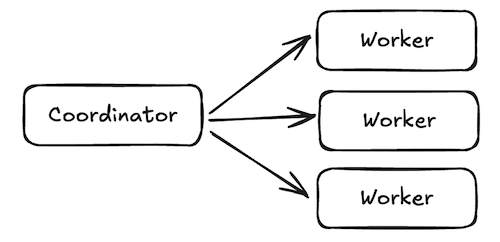
As mentioned we have N hosts which will run the same code in parallel. Each host has a worker process (or worker for short). A coordinator server will serialize the plans and send them over to each host, which upon initialization will create a fragment, which contains the plan plus some execution metadata. This will be used to create a task. The nodes from the DAG are instantiated as operators, which are the classes that implement the logic for that node.
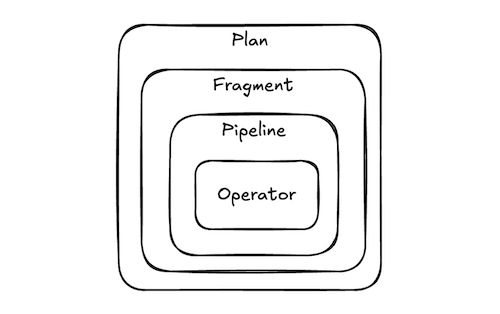
A fragment can be subdivided in stages called pipelines. This is useful when there’s internal shuffling. We’ll cover this in detail later. The work to process a given pipeline can be parallelized. A unit of this work is called a driver (note that this is not the same thing as a thread). Different pipelines can have different parallelism. So if we call $p_i$ the parallelism of pipeline $i$ and that we have $k$ pipelines, the number of drivers would be:
\[D = \sum_{i=1}^k p_i\]Since loading the whole data at once into memory is prohibitive, the data are chunked in batches which are the Velox vectors we saw recently. The instructions for querying these batches are called splits (e.g. which file and offset to read). There’s a centralized queue to which splits are added and from which drivers read from.
Typically the creation of splits is not the task itself, but the central coordinator we mentioned earlier. The worker will expose an API which the coordinator can call to add splits, so it will itself decide how to split the data and distribute to the workers pool. It’s a push model.
A task can either run on single thread (serial mode) or via a thread pool, e.g. using Folly’s CPUThreadPoolExecutor (parallel mode). In the serial mode the drivers run on the same thread as the task. Note that it’s possible to have more drivers than threads: the threads in the pool will multiplex to handle the drivers.
When a driver is set to run on a thread it reads a split from the (shared) queue and it executes it through the DAG. It will eventually block, which can happen for several reasons: the split queue is empty, it has been running for too long (avoid starving other drivers), or one of its operators is blocked (e.g. performing I/O).
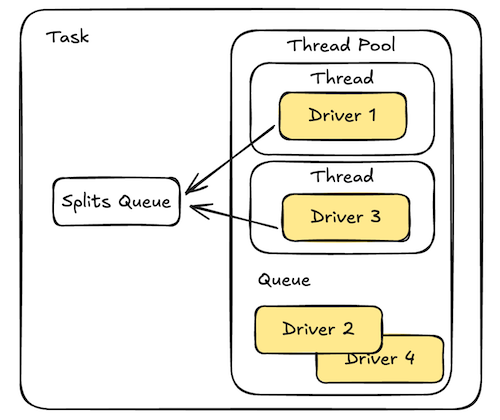
In serial mode, this yields control back to the task, who will then run the next driver round-robin fashion. In parallel mode, the driver is rescheduled to the end of the thread pool (recall from [2] that CPUThreadPoolExecutor has a queue) and it will be eventually given a thread to run it again.
At this point we have a mental model of how things fit together in a simple Velox application, and we have the main concepts and terminology laid out so we can refer to them in the discussion that follows. In the second part of this post we’ll cover a minimal example to ground our understanding on real code.
Example
To simulate a Velox worker we’ll write a standalone C++ binary that reads data from a file, does some filtering and writes it back to a file on a single thread.
Connectors
Connectors are used to read/write data from/to external storage. For our example we’ll use a Hive connector which can be used to read files as well.
First we create a connector and register it:
void registerDependencies() {

    const std::string kFileConnectorId = "file-connector";
    connector::hive::HiveConnectorFactory factory;

    auto connectorConfig = std::make_shared<config::ConfigBase>(
        std::unordered_map<std::string, std::string>());

    // HiveConnector
    std::shared_ptr<connector::Connector> fileConnector =
        factory.newConnector(kFileConnectorId, connectorConfig);

    connector::ConnectorRegistry::global().insert(
        fileConnector->connectorId(), fileConnector);

    ...
}
There’s not much to comment here, since it’s mostly boilerplate. We just notice the existence of a global connector registry.
The “Hive” in HiveConnector is a bit misleading. It is actually very modular and can read files from anywhere and in many different formats by installing plugins. For our example:
void registerDependencies() {
    ...

    filesystems::registerLocalFileSystem();
    text::registerTextReaderFactory();

    ...
}
The first allows the connector to read from the local filesystem and the second allows it to construct Velox vectors from plain text. An analogous construct is used for writes:
void registerDependencies() {
    ...

    dwio::common::registerFileSinks();
    text::registerTextWriterFactory();

    ...
}
Expressions
Velox doesn’t provide UDFs out of the box, but like with the connectors, we can register UDFs. In this case we’ll use those from Presto/Prestissimo:
void registerDependencies() {
    ...

    functions::prestosql::registerAllScalarFunctions();

    ...
}
Velox also doesn’t parse expressions, but we’ll use a test utility called PlanBuilder() to help us and create a Velox fragment:
exec::test::PlanBuilder()
...
.filter("\"class\" = 'Mammal'")
...
.planFragment();
To assign types to expressions, we need to register the type resolution plugin explicitly:
void registerDependencies() {
    ...

    parse::registerTypeResolver();
}
One question I had is why this registration is explicit instead of being done by PlanBuilder. My understanding is that this API is meant for unit tests, so the registration only happens once but PlanBuilder is run on each test case.
Creating a fragment
As discussed before, we’ll use the PlanBuilder utility to build the fragment. The flow is pretty self-descriptive:
core::PlanFragment buildScanFilterWritePlan(
    const RowTypePtr& schema,
    const std::string& outputDir,
    core::PlanNodeId& scanNodeId) {
    auto fragment =
        exec::test::PlanBuilder()
            .startTableScan()
            .connectorId(kFileConnectorId)
            .outputType(schema) // (1)
            .dataColumns(schema) // (2)
            .endTableScan()
            .capturePlanNodeId(scanNodeId) // (3)
            .filter("\"class\" = 'Mammal'") // (4)
            .startTableWriter()
            .connectorId(kFileConnectorId)
            .outputDirectoryPath(outputDir->getPath())
            .fileFormat(dwio::common::FileFormat::TEXT)
            .endTableWriter()
            .planFragment();
}
We require providing the schema twice at (1) and (2) which is confusing, but just because they happen to be the same in this example. outputType indicates the schema of the data fed into the DAG, while dataColumns is the schema available. So for example the table could have 50 columns which would be listed in dataColumns but we could select only 2, which would be outputType. This allows the connector to perform pushdown selection, for example it could decide to prune the other columns even before it sends them over the wire.
We pass a string for the expression in (4) as discussed in Expression. In (3) we capture the scan node ID since we’ll need to refer to it later.
Creating a task
std::shared_ptr<exec::Task> makeTask(
    const std::shared_ptr<folly::Executor>& executor,
    const std::string& id,
    const core::PlanFragment& plan) {
    return exec::Task::create(
        id,
        plan,
        /*destination=*/0, // (1)
        core::QueryCtx::create(),
        exec::Task::ExecutionMode::kSerial,
        exec::Consumer{});
}
This is mostly straightforward. There’s a very important nuance about the parameter destination (1). It’s only used by aggregator jobs and it’s related to partition affinity.
As we mentioned before the coordinator assigns splits across the mapper workers in a generic way. There’s no affinity between data and workers. For the reducer side however, all reduce workers must read the data from all mapper workers but only the portion corresponding to its share, so there’s affinity between worker and what it reads.
Reading Data
We’ll assume data is stored in CSV format in a file, corresponding to the table we used in [2], which we replicate here:
| Species         | Class     |
| --------------- | --------- |
| Axolotl         | Amphibian |
| Fennec Fox      | Mammal    |
| Aardvark        | Mammal    |
| Shoebill        | Bird      |
| Leafy Seadragon | Fish      |
| Quokka          | Mammal    |
As we discussed, the worker will typically expose an API so that a coordinator would feed split into it. For our example, we’ll have the main thread add the splits on its own. We first add a function that creates a split to read from a file.
std::shared_ptr<connector::hive::HiveConnectorSplit> buildSplit(
    const std::string& filePath) {

    auto split = connector::hive::HiveConnectorSplitBuilder(
        "file:" + filePath)
        .connectorId(kFileConnectorId) // (1)
        .fileFormat(dwio::common::FileFormat::TEXT)
        .serdeParameters({"field.delim", ","}) // (2)
        .build();
}
It uses the connector we just registered by specifying the id kFileConnectorId (1). Since it’s a comma-separated file, we specify it in (2). Now we create the function that reads files from a directory and feeds the split into a task’s source:
void addSplits(
    const std::shared_ptr<exec::Task>& task,
    const core::PlanNodeId& scanNodeId,
    const std::string& dir) {
  for (auto& entry : fs::directory_iterator(dir)) {
    task->addSplit(
        scanNodeId, // (1)
        exec::Split{buildSplit(entry.path().string())} // (2)
    );
  }
  task->noMoreSplits(scanNodeId); // (3)
}
Because the DAG being run by the task might have multiple sources, we need to explicitly tell the node upon which we are adding the splits by passing its id (1).
The struct exec::Split (2) is a thin wrapper around the connector split with extra execution metadata.
When we call noMoreSplits() (3) we’re effectively shutting down the channel for that particular node, and we can’t re-open later, unless a new task is created.
Running
In serial mode, the main thread drives the execution of the task by calling next() on it. It returns the output of the DAG, but since we’re writing to a file sink we don’t care about the returned results and can just call it in a loop:
void runToCompletion(const std::shared_ptr<exec::Task>& task) {
  while (auto result = task->next()) {
  }
}
Putting it all together:
auto pool = memory::memoryManager()->addLeafPool();
auto data = makeData(pool.get()); // (1)

registerDependencies();

auto inputDir = TempDirectoryPath::create();
auto outputDir = TempDirectoryPath::create();

const std::string inputCsvPath = inputDir->getPath() + "/animals.csv";
writeCsv(data, inputCsvPath); // (2)

auto schema = asRowType(data->type());
core::PlanNodeId scanNodeId;
auto pipeline =
    buildScanFilterWritePlan(schema, outputDir->getPath(), scanNodeId);

auto filterTask = makeTask("scan-filter-write", pipeline);
addSplits(filterTask, scanNodeId, inputDir->getPath());
runToCompletion(filterTask);
Because we used helper functions when covering different sections, this code should be self-explanatory. The only implementation we didn’t cover explicitly is (1), which should be the one in [1] and (2) which traverses the Velox vector, also covered in [1], and uses std::ofstream to write to a file.
Parallel
The parallel version is very similar. What changes is how we create the task and run it. For creation:
std::shared_ptr<exec::Task> makeParallelTask(
    folly::Executor* executor,
    const std::string& id,
    const core::PlanFragment& plan) {
  auto drain = [](RowVectorPtr,
                  bool,
                  ContinueFuture*) {
    return exec::BlockingReason::kNotBlocked;
  };

  return exec::Task::create(
      id,
      plan,
      /*destination=*/0,
      core::QueryCtx::create(executor), // (1)
      exec::Task::ExecutionMode::kParallel, // (2)
      std::move(drain));  // (3)
}
Besides the executor (1) (e.g. Folly’s CPUThreadPoolExecutor) and the kParallel mode (2), the major difference is the drain callback. A TableWrite is not a true sink because it produces output (row counts, written file fragments).
In serial mode we actually get these output when calling next(), but we discard them (see Running), but in parallel mode, since we’re not explicitly driving the execution ourselves, we need an actual terminal sink, which in this case also discards the output.
The running of a parallel task can be:
void runToCompletionParallel(
    const std::shared_ptr<exec::Task>& task,
    const core::PlanNodeId& scanNodeId,
    const std::string& inputDir) {
  task->start(/*maxDrivers=*/4); // (1)
  addSplits(task, scanNodeId, inputDir, kInputDelim);
  task->taskCompletionFuture().wait(); // (1)
}
Once we start the task with 4 drivers, it will start running right away and only stop until the task receives a noMoreSplits() signal. Typically the addSplits() would be run on a separate thread.
The full code is available on Github.
Conclusion
In this post we presented a minimal example of using Velox to process data end-to-end. In this process we covered the different concepts and terminology from Velox and provided a mental model for the execution, both serial and parallel.
This example serves as a base from which to dive deeper into the Velox internals: execution and memory management.
Related Posts
Map-reduce appears everywhere in distributed systems: Google’s FlumeJava is similar in spirit in the sense that it’s a library that can be used to construct map-reduce jobs. It seems to operate at a higher level because it also deals with the creation of the jobs, while Velox is the underlying execution layer only.
This is somewhat similar to Spark’s RDDs and in fact in [3] the authors mention using Velox as the alternative engine for Spark.
We didn’t talk about them explicitly, but Velox relies on Folly Futures as we can see via the taskCompletionFuture() call in the last example.